Summary
It is known that Cloudera has no official support for Tez execution engine. They push their customers to use Impala instead (or Hive on Spark nowadays). This article describes how we set Tez engine up on CDH cluster including Tez UI.
Install Java/Maven
Follow official instructions on how to install Java. Ensure version is same as the one you have your CDH cluster running on. In our case it is Java 7 update 67.
Follow instructions to install latest version of Maven.
Download Tez source
Download source from Tez site. We built 0.8.4 version for use on CDH 5.8.3 cluster.
Build Tez
As of this writing, Cloudera doesn’t support timeline server that ships with it’s distribution. If you want to host Tez UI, timeline server is required. A choice is to use apache version of timeline server. Timeline server that ships with hadoop 2.6 or later versions uses 1.9 version of jackson jars. CDH 5.8.3 however, uses 1.8.8 version of jackson jars, so we need to ensure when we build Tez against CDH, we need to ensure it is built with right jackson dependencies to ensure Tez is able to post events to apache version of timeline server.
Build protobuf 2.5.0
Tez requires protocol buffers 2.5.0. Download the source code from here. Build the binaries locally.
tar xvzf protobuf-2.5.0.tar.gz
cd protobuf-2.5.0
./configure --prefix $PWD
make
make check
make install
Verify version like so:
bin/protoc --version
libprotoc 2.5.0
Setup git protocol
Our firewall blocked git protocol, so we set it up to use https protocol.
git config --global url.https://github.com/.insteadOf git://github.com/
Build against CDH repo
Since we want to maintain compatibility with existing CDH installation, it’s a good idea to build against CDH 5.8.3 repo. Let’s create a new maven build profile for that.
    <profile>
       <id>cdh5.8.3</id>
       <activation>
       <activeByDefault>false</activeByDefault>
       </activation>
       <properties>
         <hadoop.version>2.6.0-cdh5.8.3</hadoop.version>
         <pig.version>0.12.0-cdh5.8.3</pig.version>
       </properties>
       <pluginRepositories>
         <pluginRepository>
         <id>cloudera</id>
         <url>https://repository.cloudera.com/artifactory/cloudera-repos/</url>
         </pluginRepository>
       </pluginRepositories>
       <repositories>
         <repository>
           <id>cloudera</id>
           <url>https://repository.cloudera.com/artifactory/cloudera-repos/</url>
         </repository>
       </repositories>
    </profile>
However, this repo will by default download 1.8.8 version of jackson jars, which will not work when Tez tries post events to apache timeline server, let’s ensure we specify those dependencies right.
     <dependency>
        <groupId>org.codehaus.jackson</groupId>
        <artifactId>jackson-mapper-asl</artifactId>
        <version>1.9.13</version>
      </dependency>
      <dependency>
        <groupId>org.codehaus.jackson</groupId>
        <artifactId>jackson-core-asl</artifactId>
        <version>1.9.13</version>
      </dependency>
      <dependency>
        <groupId>org.codehaus.jackson</groupId>
        <artifactId>jackson-jaxrs</artifactId>
        <version>1.9.13</version>
      </dependency>
      <dependency>
        <groupId>org.codehaus.jackson</groupId>
        <artifactId>jackson-xc</artifactId>
        <version>1.9.13</version>
      </dependency>
Here’s the complete pom.xml under the top level tez source directory for reference, in pdf format.
Finally, build Tez:
mvn -e clean package -DskipTests=true -Dmaven.javadoc.skip=true -Dprotoc.path=<location of protoc> -Pcdh5.8.3
Run Apache timeline server
We are going to run timeline server that ships with 2.7.3 version of apache hadoop. Install it on a separate server. Copy core-site.xml from CDH cluster. Change yarn-site.xml to have right timeline server properties.
  <property>
    <name>yarn.timeline-service.store-class</name>
    <value>org.apache.hadoop.yarn.server.timeline.LeveldbTimelineStore</value>
  </property>
  <property>
    <name>yarn.timeline-service.leveldb-timeline-store.path</name>
    <value>/var/log/hadoop-yarn/timeline/leveldb</value>
  </property>
   <property>
     <name>yarn.timeline-service.bind-host</name>
     <value>0.0.0.0</value>
   </property>
   <property>
     <name>yarn.timeline-service.leveldb-timeline-store.ttl-interval-ms</name>
     <value>300000</value>
   </property>
   <property>
     <name>yarn.timeline-service.hostname</name>
     <value>ATS_HOSTNAME</value>
   </property>
   <property>
     <name>yarn.timeline-service.http-cross-origin.enabled</name>
     <value>true</value>
   </property>
Start the timeline server after setting right environment variables.
yarn-daemon.sh start timelineserver
Install httpd
We are going to use apache web server to host Tez-UI.
yum install httpd
Untar tez-ui.war file that was built as part of Tez in the directory pointed to by DocumentRoot (default /var/www/html).
cd /var/www/html
mkdir tez-ui
cd tez-ui
jar xf tez-ui.war
ln -s . ui -- this is because UI is looking for <base_url>/ui from YARN UI when the app is still running
Setup YARN on CDH
Add following properties to YARN configuration of CDH cluster in “YARN Service Advanced Configuration Snippet (Safety Valve) for yarn-site.xml” and restart the service.
<property>
  <name>yarn.timeline-service.http-cross-origin.enabled</name>
   <value>true</value>
</property>
<property>
   <name>yarn.resourcemanager.system-metrics-publisher.enabled</name>
   <value>true</value>
</property>
<property>
   <name>yarn.timeline-service.generic-application-history.enabled</name>
   <value>true</value>
</property>
<property>
   <name>yarn.timeline-service.enabled</name>
   <value>true</value>
</property>
<property>
   <name>yarn.timeline-service.hostname</name>
   <value>ATS_HOSTNAME</value>
</property>
Setup Tez
Ensure you copy tez-0.8.4.tar.gz that got created when you built Tez to HDFS. Let’s say we copied it to /apps/tez. This has all the files needed by Tez.
hdfs dfs -copyFromLocal tez-0.8.4.tar.gz /apps/tez
On client, extract tez-0.8.4.tar.gz in installation (let’s use /usr/local/tez/client) directory.
ssh root@<client>
mkdir -p /usr/local/tez/client
cd /usr/local/tez/client
tar xvzf <location on FS>/tez-0.8.4.tar.gz
Setup /etc/tez/conf/tez-site.xml on the client. Following are some of the properties needed to make Tez work properly.
  <property>
    <name>tez.lib.uris</name>
    <value>/apps/tez/tez-0.8.4.tar.gz</value>
  </property>
  <property>
    <name>tez.use.cluster.hadoop-libs</name>
    <value>false</value>
  </property>
  <property>
    <name>tez.tez-ui.history-url.base</name>
    <value>UI_HOSTNAME/tez-ui</value>
  </property>
  <property>
    <name>yarn.timeline-service.hostname</name>
    <value>ATS_HOSTNAME</value>
  </property>
  <property>
    <name>yarn.timeline-service.enabled</name>
    <value>true</value>
  </property>
  <property>
    <name>tez.task.launch.env</name>
    <value>LD_LIBRARY_PATH=/opt/cloudera/parcels/CDH/lib/hadoop/lib/native</value>
  </property>
  <property>
    <name>tez.am.launch.env</name>
    <value>LD_LIBRARY_PATH=/opt/cloudera/parcels/CDH/lib/hadoop/lib/native</value>
  </property>
  <property>
    <name>tez.history.logging.service.class</name>
    <value>org.apache.tez.dag.history.logging.ats.ATSHistoryLoggingService</value>
  </property>
Ensure HADOOP_CLASSPATH is set properly on tez client.
export TEZ_CONF_DIR=/etc/tez/conf
export TEZ_JARS=/usr/local/tez/client
export HADOOP_CLASSPATH=${TEZ_CONF_DIR}:${TEZ_JARS}/*:${TEZ_JARS}/lib/*:`hadoop classpath`
If you are using hiveserver2 clients (beeline, HUE), ensure you have extracted tez-0.8.4.tar.gz contents in /usr/local/tez/client (as an example), and created /etc/tez/conf/tez-site.xml like you did on Tez client. In addition, set the HADOOP_CLASSPATH with actual values in hive configuration on CM at Hive Service Environment Advanced Configuration Snippet (Safety Valve). Once done, restart hive.
HADOOP_CLASSPATH=/etc/tez/conf:/usr/local/tez/client/*:/usr/local/tez/client/lib/*:/etc/hadoop/conf:/opt/cloudera/parcels/CDH/lib/hadoop/libexec/../../hadoop/lib/*:/opt/cloudera/parcels/CDH/lib/hadoop/libexec/../../hadoop/.//*:/opt/cloudera/parcels/CDH/lib/hadoop/libexec/../../hadoop-hdfs/./:/opt/cloudera/parcels/CDH/lib/hadoop/libexec/../../hadoop-hdfs/lib/*:/opt/cloudera/parcels/CDH/lib/hadoop/libexec/../../hadoop-hdfs/.//*:/opt/cloudera/parcels/CDH/lib/hadoop/libexec/../../hadoop-yarn/lib/*:/opt/cloudera/parcels/CDH/lib/hadoop/libexec/../../hadoop-yarn/.//*:/opt/cloudera/parcels/CDH/lib/hadoop-mapreduce/lib/*:/opt/cloudera/parcels/CDH/lib/hadoop-mapreduce/.//*
Run clients
-bash-4.1$ hive

Logging initialized using configuration in jar:file:/apps/cloudera/parcels/CDH-5.8.3-1.cdh5.8.3.p0.2/jars/hive-common-1.1.0-cdh5.8.3.jar!/hive-log4j.properties
WARNING: Hive CLI is deprecated and migration to Beeline is recommended.
hive> set hive.execution.engine=tez;
hive> select count(*) from warehouse.dummy;
Query ID = nex37045_20170305002020_18680c2c-0df1-4f5c-b0a5-5d511da78c63
Total jobs = 1
Launching Job 1 out of 1

Status: Running (Executing on YARN cluster with App id application_1488498341718_39067)

--------------------------------------------------------------------------------
        VERTICES      STATUS  TOTAL  COMPLETED  RUNNING  PENDING  FAILED  KILLED
--------------------------------------------------------------------------------
Map 1 ..........   SUCCEEDED      1          1        0        0       0       0
Reducer 2 ......   SUCCEEDED      1          1        0        0       0       0
--------------------------------------------------------------------------------
VERTICES: 02/02  [==========================>>] 100%  ELAPSED TIME: 6.91 s
--------------------------------------------------------------------------------
OK
1
Time taken: 19.114 seconds, Fetched: 1 row(s)
hive>
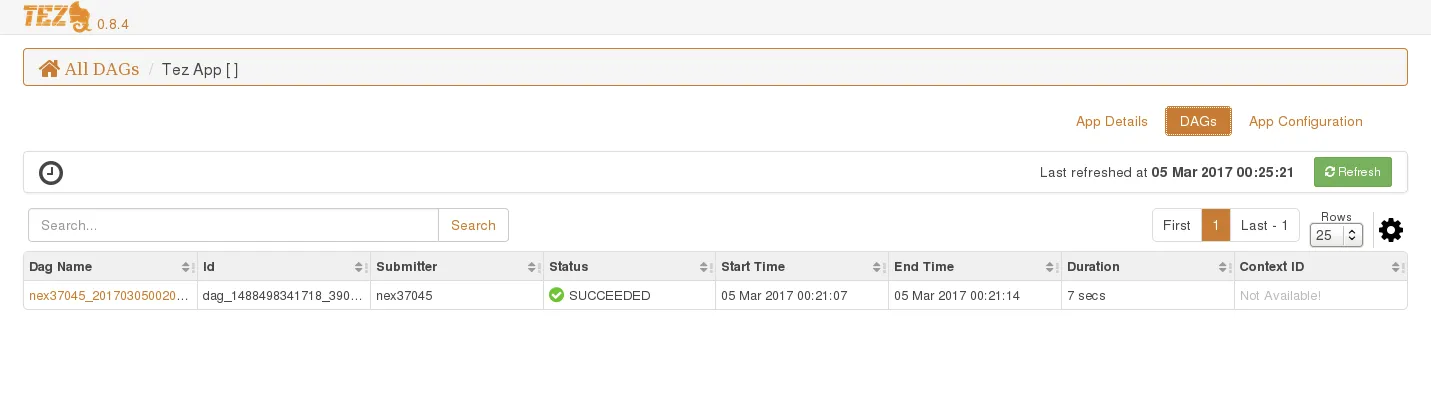
You should see details for this job in Tez UI now.